.jpg)
.jpg)
.jpg)

Track Calories & Nutrition with Runtastic Balance
Overview
Runtastic Balance is a free desktop application designed to support users in managing their weight through effective calorie and nutritional tracking. The software enables individuals to monitor daily food intake via a built-in food diary, providing insights into macronutrient and micronutrient consumption. By logging meals and snacks, users gain a clearer understanding of their dietary habits, which can lead to more informed and healthier choices. The app is tailored for individuals focused on weight loss, weight gain, or maintaining a balanced lifestyle, particularly those aiming to improve stamina, build muscle, and adopt sustainable eating patterns.
Designed for both casual users and fitness enthusiasts, Runtastic Balance simplifies the process of tracking dietary intake without requiring advanced nutritional knowledge. It allows users to set personalized weight goals, after which the app calculates an ideal daily calorie intake. This functionality supports long-term behavior change by aligning daily food consumption with specific health objectives. The software is accessible on multiple platforms, including Android and iOS, and is intended for use in real-world settings such as home, work, or while traveling.
The developer did not provide additional information about the company or its background. Platform compatibility details were partially provided, indicating support for Android and iOS devices. No specific desktop OS compatibility was listed. The application is available at no cost, making it accessible to a broad audience seeking tools for healthy living.
Key Features & Capabilities
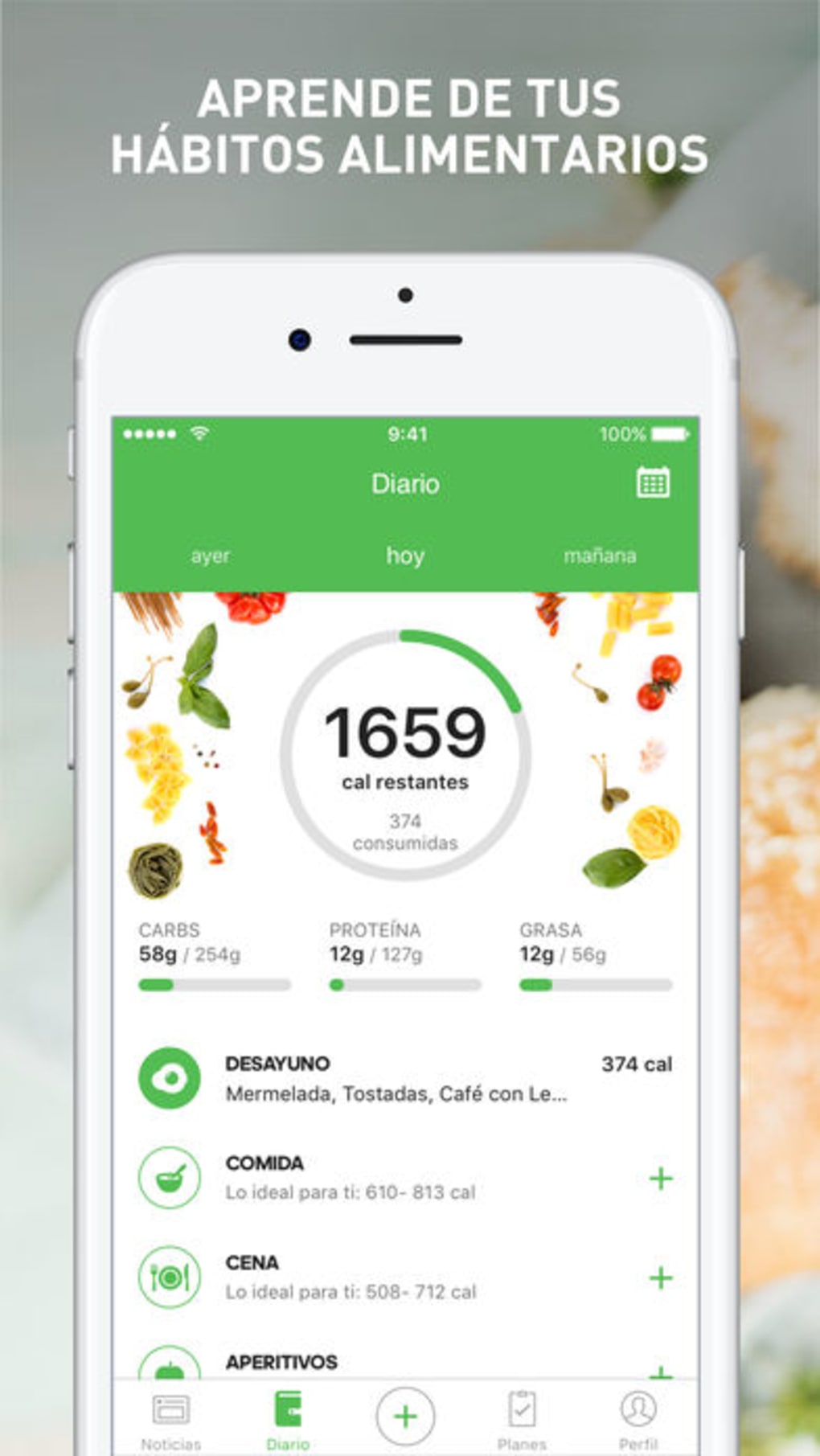
- Food Diary Functionality – Users can log meals and snacks throughout the day, recording what they eat with minimal effort. This feature supports consistent tracking and helps identify patterns in eating behavior.
- Comprehensive Food Database – The app includes a localized, detailed food database that allows quick and accurate logging of common and specialty items, reducing the time required to enter data.
- Nutritional Breakdown – Each logged food item displays a detailed analysis of macronutrients (carbohydrates, proteins, fats) and micronutrients, helping users understand the full nutritional profile of their meals.
- Goal-Based Calorie Planning – By entering a target weight, the app computes an optimal daily calorie intake to support weight loss, gain, or maintenance, aligning nutrition with personal objectives.
- Macro and Micro Tracking – The software tracks both macronutrient and micronutrient intake, enabling users to balance their diet according to specific health or fitness goals.
These features collectively support users in creating a sustainable and informed approach to nutrition. For example, a user aiming to gain muscle mass can use the macro tracker to ensure adequate protein intake, while someone managing weight loss can monitor calorie consumption in real time. The food diary can be updated anywhere, anytime, making it suitable for on-the-go use. The integration of goal-based planning enhances motivation and accountability, turning daily habits into measurable progress.
User Interface, Workflow & Performance
Runtastic Balance features a clean, intuitive interface designed for ease of navigation and efficient workflow. The layout prioritizes key functions such as logging meals, viewing daily summaries, and accessing nutritional data. Users can typically access the food diary and tracking tools with just a few taps or clicks, minimizing friction in the logging process.
Navigation is structured around core activities: logging food, reviewing intake, and adjusting goals. The app supports quick entry options, such as scanning barcodes or selecting from recent meals, which streamlines the user experience. Workflow efficiency is enhanced by the ability to save frequently consumed items and set meal templates, reducing repetitive input.
Performance observations are based on general software behavior patterns. The developer did not specify resource usage details. No information was provided about CPU or RAM usage, stability under prolonged use, or responsiveness during peak activity. The application is designed for mobile platforms, and its desktop performance is not documented. Users should expect standard operation based on typical app behavior.
Compatibility & System Requirements
Runtastic Balance is available on Android and iOS operating systems. The software version is 1.1.5, with a file size of 100 MB. This indicates a lightweight application suitable for mobile devices with moderate storage capacity.
Compatibility information was partially provided. The developer did not specify exact system requirements, such as minimum OS versions, processor speed, or RAM. No details were given about desktop compatibility, including Windows or macOS support. Users should verify device compatibility through official app stores. The application is designed for mobile use, and its desktop functionality, if any, is not documented.
Exact system requirements were not listed. Users should ensure their device meets the standards set by the respective app store. For optimal performance, devices should have a stable internet connection for database access and real-time updates.
Pros and Cons
Pros
- Free to use with no cost barriers
- Intuitive food diary for easy meal logging
- Comprehensive food database with localized content
- Supports both weight loss and weight gain goals
- Provides detailed macro and micronutrient tracking
Cons
- Desktop compatibility not specified
- No information on resource usage or performance metrics
- Developer background not disclosed
- Platform support limited to mobile devices
- Updates and version history not detailed
FAQ Section
Is Runtastic Balance available for desktop computers?
The developer did not provide information on desktop compatibility. The software is primarily designed for mobile platforms, and its availability on Windows or macOS is not confirmed.
Is the app safe to use and secure?
Runtastic Balance is available through official app stores, which typically enforce security standards. However, the developer did not disclose specific data privacy policies or security measures.
How often are updates released?
Version 1.1.5 was released on May 20, 2024. No information was provided about the update frequency or release schedule.
What type of license does Runtastic Balance use?
The software is offered as free-to-use with no visible licensing model. It is not classified as open-source or proprietary in the provided information.
Can I use Runtastic Balance offline?
Offline functionality was not specified. The app likely requires an internet connection for database access and synchronization, but this is not confirmed.
Final Thoughts + CTA
Runtastic Balance stands out as a practical, accessible tool for individuals committed to improving their nutrition and achieving weight-related goals. Its core features—food logging, nutritional breakdown, and goal-based calorie planning—offer real value for users seeking to adopt healthier eating habits. While desktop compatibility and performance details are not available, the app’s mobile-first design ensures broad accessibility for on-the-go tracking.
Those focused on fitness, wellness, or long-term lifestyle changes will benefit most from its structured approach to nutrition. The free model removes financial barriers, making it an attractive option for a wide audience. Despite limited transparency around system requirements and developer background, the software delivers on its promise of simplicity and functionality.
Download Runtastic Balance now







